We are excited to introduce the stunning and distinctive modern scripted typeface, Lost in Wind Font, which features remarkable background textures perfect for various large-scale projects. This fabulous typeface is available for free and can be used in both commercial and personal endeavors.
The font contains only regular styles that come with more than 230 glyphs and also it contains alternates and swashes which will make any type of graphic design attractive and interactive.
We are sharing this font in truetype and opentype format that can easily integrate in all kind of operating systems or computers you have.
View Of Lost in Wild Font
Don’t locate on further section, view the picture here that we attached under the paragraph that contains an example of the text of this font that is suitable for super kids font which is suitable for all types of designs.
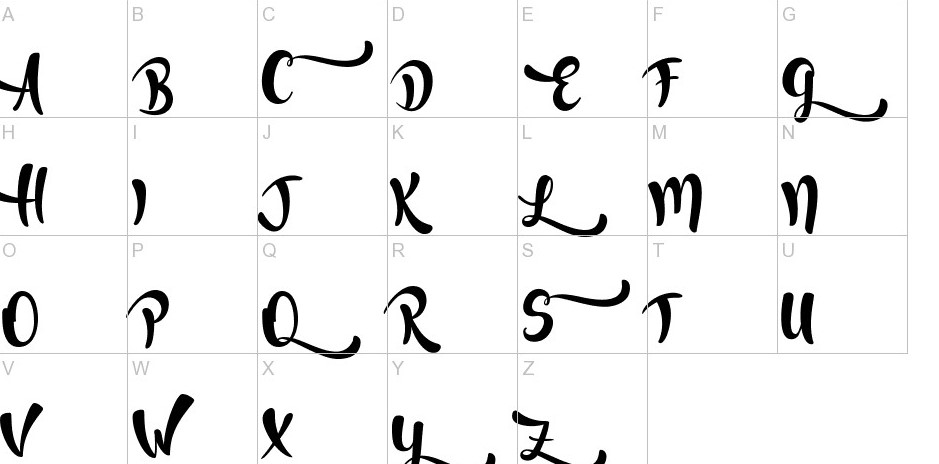
The font contains gorgeuos scripted and handwritten styled typeface which is suitable for making anytype of large projects easily.
Usage
This unque and elegant font that is suitable to use with brusher font which has a popular texture so that can also be used in pairing also. That’s why each designer treated it as a really perfect font in all appreciate.
- Banner and retargeting ads
- App design
- Vehicle wraps
- Tutorial videos
- Magazine and newspaper ads
- Advertisements
Font Details
| Name | Lost in wild Font |
| Style | Brush |
| Designer | Francis Studio |
| File Format | OTF, TTF |
| License | Free for Personal Use |
| Type | Free Version |
License Information
If you want to designed you projects for your personal use the it is free. However, if you would like to use it for commercial purpose then you have to purchase it or contact author for permissions.
Lost in Wild Font Free Download
You can get the beautiful font that comes in the zip format. You can extract it easily with Winrar after that you will discovered your font files that is in TTF and OTF formats.
Similar Fonts to Lost in Wild
- Handletter Font
- Moabhoers Font
- Brusher Font
- Solmet Marker Font
- Bakery Font
Font Family Includes
- Lost in Wild Regular
Supported Languages
Faroese, Finnish, French, Frisian, Friulian, Gaelic (Irish, Scots), Gagauz (Latin), Galician, German, Hungarian, Icelandic, Indonesian, Irish, Italian, Karelian, Ladin, Latvian, Lithuanian, Maltese, Moldavian (Latin), Norwegian, Polish, Portuguese, Rhaeto-Romanic, Romanian, Saami (Southern), Serbian, Slovak, Slovenian, Sorbian, Spanish, Swahili, Swedish, Turkish, Turkmen (Latin).
Font FAQS
What Type of Font Is Lost in Wild?
The Lost in Wild Font is the famous and amazing typeface which was product of the combination efforts by Pablo Cosgaya and Hector Gatti.
Can I Use Lost in Wild Font on My Website?
Yes You can use the Lost in Wild website on your website and can make your website design more beautiful.
Is Lost in Wild a Free Font?
The Lost in Wild Font is available to download free for personal use but if you want to use it for commercial purpose then you might need permission from the owner.
Can I Download and Use Lost in Wild Font in My Pc and Mac?
Yeah You can download it for any OS like mac, ubuntu, and windows also.
Can I Use Lost in Wild for My Logo?
Of course you can use the Lost in Wild for your logo as well as all other graphic designs projects.
How to Install Lost in Wild in Mac or Windows PC?
You can check out our Font Installation in windows guide or a separate guide on installation of Fonts in Mac.
Leave a Reply